Friday, 7 March 2014

Thursday, 6 March 2014

2014:Grade 12 Theory Sfiso Ka-Mkame Drawings


Below are some examples of the Grade 12's drawings based on their theory artwork and the sgrafito technique.

Artworks below by (left to right, top to bottom): Shiyaam Layloo, Kayla Campkin, Nitashe Pierce, Lindo Mfeka, Chelsee Davids and Stacey Petzer.

Artworks below by (left to right. top to bottom): Kelsey Goosen, Lindo Mfeka (repeat) and Lauren Coetzee 

Below are Tamlyn and Tivana's drawings:

Below from Left to right: Edgar the vicious by Nikayle Govender,  and stunning figures by Carmen Coetzee and Bongeka Khuzwayo

Drawings  by (from left to right): Kendal Smith and Shriya Bhimjee


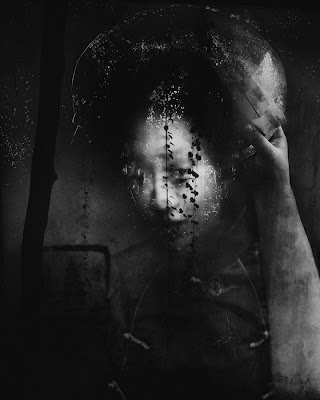
Sfiso Ka-Mkame: Ancestral Spirits


Wednesday, 5 March 2014

2014: Grade 11: Political Posters


Below are the Election Posters that Grade 11's Designed based on the techniques they learnt in the Art of Persuasion.  Their final products are compelling images that are full of creativity and talent.


Monday, 3 March 2014

2014: Grade 11 and 12: Personal Geographies: Final Product

Final Product:

  • By this stage you should know which effects suit your work the most.
  • Scan in your drawing as a TIFF at 200 or 300 resolution.
  • Add your photoshop effects, adjust the levels and image size.
  • Add your figures digitally or
  • Print out  your work on a larger scale (at least A3).
  • You may now start adding your final figures using collage methods.
  • Your final product can be a mixture of drawing, Photography and collage.
Remember to hand in your original photos and screen shots of your editing process.

http://lenscratch.com/2011/10/success-stories-angela-bacon-kidwell/

 Angela Bacon Kidwell's new series, Traces of Existence, combines emotion, travel, the unknown, and the new, all mixing into new ways of working and seeing.

Layers Links: 
http://www.wikihow.com/Use-Layers-for-Digital-Art

http://www.digitalartsonline.co.uk/tutorials/photoshop/digital-tricks-for-hand-drawn-colour/


2014 Grade 9: Collage Project


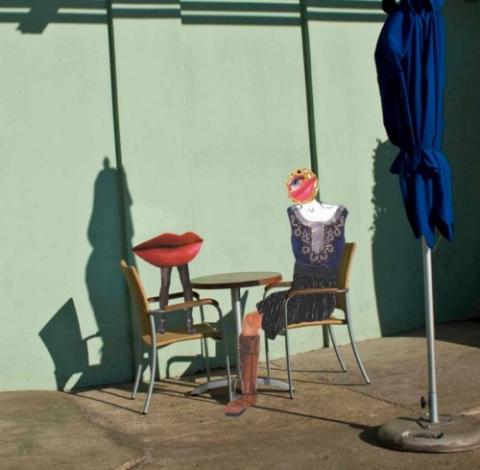
Frolic 1 Amy Jo Windt

Practical Project 1: Create a Group collage, using the packs you created in class.

Practical Project 2: Create a story in a box about someone who has influenced how you see beauty.

Link to 2014 Grade 9 Collage Project Briefs

Below are some links to a collection of inspirational images.

Thursday, 27 February 2014

2014 Grade 11 and 12: Personal Geographies: Final Intention Postcards

So far you have completed and handed in the following stages:

Conceptual development:

  • Illustrated Mindmap about your thoughts on the theme Personal Geographies
  • Illustrated storyboard (thumbnails) of where you planned to take photos
Experiments
  • At least 5 of your own Photos 
  • Written Reflections  and diagrams showing the compositional techniques you used in your work
  • Notes and Diagrams on the illusions of space illustrated in your photos and drawings.
Drawings
  • Illustrations throughout your sourcebook especially in your mindmap and storyboard.
  • Any experimental drawings you may have tried over the past few weeks.
  • A competent drawing of  one of your photos (this should be at least an A4 size).


Section 2: Final Intention
  • You have been creating various figures drawings that will fit into your landscape.
  • You will now be experimenting with various compositional sketches of how you will layer your final product.
  • Scan in your drawing and play with 6 different effects for example see how you could add collage/ ink wash layers to the drawing.  If scan your drawing at a low res, you can add the filters on pixlr.com

You can also create these effects using the filters on the 2010 version of Powerpoint.


For you final intention, you will hand in your six "postcards" and  your figure drawings and photographs.


2014 Grade 11: Art and Politics:Task 2: Brett Murray


Art and Politics: Grade 11: 

Task 2: Create an infographic on Brett Murray.
  • Use the template and A3 card and image that your teacher has given you to create an infographic on Brett Murray. You could also create a prezi.
You will be writing about the following bullets:
  • Murray's Intention (i.e why Murray made this work)
  • Imagery and symbolism( what the images in the artworks mean)
  • Materials and Techniques (how Murray made the work and how his technique relates to politics)
  • Elements and Principles (e.g colour, line, contrast)
  • Please comment on why this artwork would be classed as political satire.
  • You may use the link to Anna ballantine's Pdf as a resource, but you must use your own words.

Link to Brett Murray PDF

For those of you creating a prezi...here is the censored image


Practical Activity: 


Use the halftone filter on pixlr or the cutout filter on photoshop to create your own poster style portrait.


link to post on using cutout/ halftone

link to PPT on how to use the Cut out filter on adobe Photoshop

SELF-EVALUATION FORM

Link to The Spear Self-evaluation form